How to Make the Younger Me Meets Me Now AI Video From Two Photos
In the then and now video, the you of today sits next to the you of years ago and pulls your younger self into a hug. You need two photos of yourself as an adult. Here is how to pick them and how to get both versions looking like the same person.
What the then and now trend is
People pair an old photo of themselves with a recent one and let AI put both versions in the same frame, usually with today's self hugging the younger one. It spread on TikTok and Reels as a way to mark how far someone has come, and the tone is gentle rather than funny.
On MagicTakes it is an 8-second vertical clip that looks like an ordinary phone video. For the first two seconds the younger you and the you of today sit side by side on a wooden bench and look at each other. From two to five seconds today's you puts an arm around your younger self and the two of you pull each other into a tight hug, the younger one laughing. In the last three seconds you pull back, arm still around your younger self's shoulders, and both smile at the camera.
How to make it on MagicTakes
- Open the Then and Now template.
- Choose a setting: Park bench or At home.
- Upload the first photo, You, years ago: an older photo of you as an adult, face clear.
- Upload the second photo, You now: a recent photo, face clear, chest up.
- Tap Make my take. It costs 40 credits; your first take is free with a small magictakes.com mark.
- Wait 2 to 4 minutes and download the 9:16 MP4 from your library.
Picking the two photos
The clip only works if both people read as you. That depends more on the angle of your face than on how good the photos are.
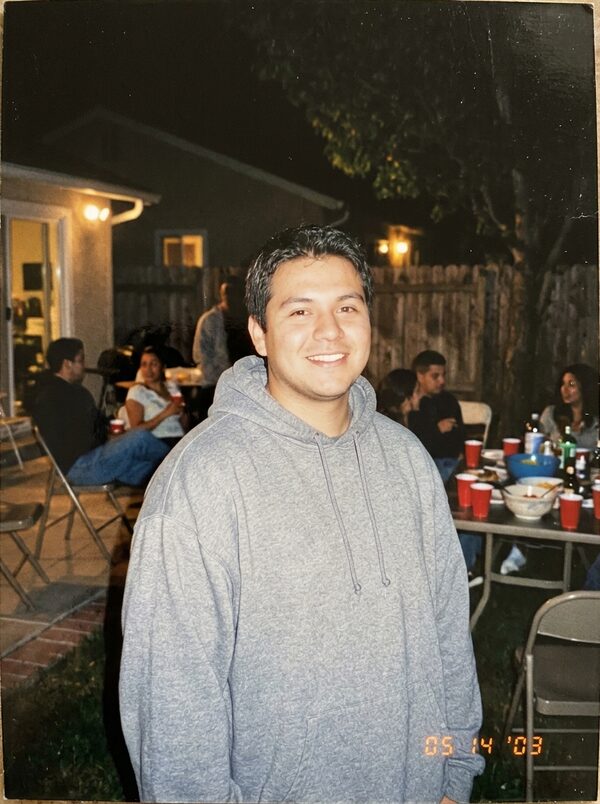
- Use an old photo where you're already an adult and your face is clear. Photos that show children can't be used.
- A scanned print is fine. A sharp scan beats a photo of a photo, and a print photographed flat in daylight without glare works too.
- Both photos chest up and facing the camera, one person each.
- Choose photos taken well apart in time, so the difference between the two of you is easy to see.
- Skip heavy filters on the recent photo. They make you look less like your older self.
Park bench or At home
Park bench is the default: the two of you side by side on a wooden bench in a sunny garden, which suits a milestone or a fresh-start post.
At home puts you on a sofa in a warm, lamp-lit living room with a quiet evening feel. It suits a more private message, such as a note to your younger self or a recovery anniversary. Whichever you choose, both versions of you are placed in the same natural-light phone video, so a faded print doesn't look out of place.
Ideas for posting it
Takes are vertical 9:16 MP4 files at 720p, ready for TikTok, Instagram Reels and YouTube Shorts. This trend tends to be posted on a meaningful day rather than at random, so it is worth making the take a day or two ahead.
- A milestone post: a birthday, a recovery, a new job, a new chapter. Caption idea: Told you it would work out.
- An anniversary of moving abroad, pairing a photo from your first week with one from today.
- A gentle message to your younger self. Write the message in the caption and let the video carry the feeling.
- Add a slow, quiet sound in the app you post to; the clip itself is silent.
- Post the two original photos as a carousel after the video for anyone curious about the before.
What goes wrong and how to fix it
- The two versions look like different people: use photos where your face is front-facing in both, and an old photo that isn't too blurry or tiny.
- The old photo comes out washed out or grainy: scan the print, or photograph it flat in daylight without glare.
- The photo was rejected: photos that show children can't be used. Pick an older photo of you as an adult.
- Both versions look the same age: choose photos taken further apart in time.
- A take fails: the 40 credits go back to your balance automatically.
A note on whose photos to use
This template is made for two photos of you. If you'd like to make one for a friend, ask them first and use their photos only with their agreement. Photos of children and of public figures can't be used. Your uploads are deleted after 30 days, and your takes are private unless you share them.
Questions
How old does the older photo need to be?
There is no set number of years. It just needs to show you as an adult, and the bigger the gap, the clearer the difference in the video.
Can I use a photo where I'm with other people?
Crop it to just you before uploading. One person per photo gives the cleanest result.
Can I use it for two different people, like a parent and their adult child?
The template is designed for two photos of the same person. For two different adults, the AI Hug template is a better fit.
What if the hug looks stiff?
Make another take from the same photos. Each take is a new attempt, and the motion varies a little each time.