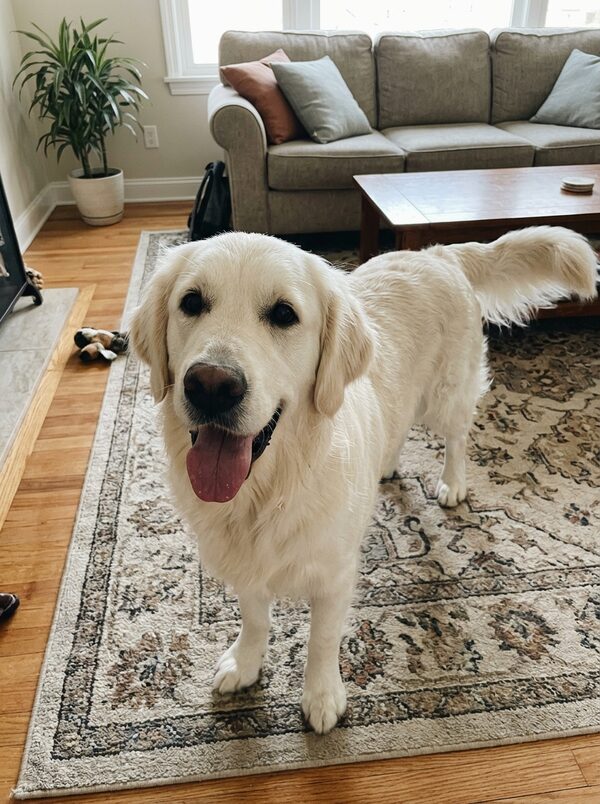
How to Make Your Dog or Cat Dance in an AI Video From One Photo
Clips of dogs and cats standing on their hind legs and dancing have become a staple of AI video feeds, and they all start from one still photo. The Dancing Pet template on MagicTakes makes one of your own pet: it stands up, bounces, spins and finishes with a proud pose, in an 8-second vertical clip.
What the dancing pet trend is
The appeal is simple: a pet you know, doing something it would never do. Because it only needs one photo, people post their own pets rather than strangers', which is why the clips feel personal.
In the MagicTakes version your pet stands up on its hind legs and bounces with its front paws up for the first few seconds. Around the three-second mark it drops down for a quick, happy spin, then gets back up on its hind legs and strikes a proud pose for the camera, grinning. It looks like a handheld phone video, with your pet's whole body in frame the whole time.
Your pet keeps its own fur, colours and markings, and its face, body shape and size stay the same. With the Living room setting it dances in the room from your own photo.
How to make it on MagicTakes
- Open the Dancing Pet template.
- Upload one photo of your pet with its whole body in view, from ears to paws.
- Choose a setting: Living room, Disco lights or Beach party.
- Tap Make my take. It costs 40 credits, and your first take is free with a small magictakes.com mark.
- Wait two to four minutes. You can leave the page; the take is saved in your library when it is ready.
- Download the 8-second 9:16 MP4 and add a sound when you post.
Which photo works best
Dancing uses the whole body, so this is one template where a face close-up doesn't work well.
If you only have a close-up, take a new photo from a little further back, at your pet's height, while it is standing. Crouching down to its level gives a straighter view of the body and a more natural dance.
- The whole pet in view, from ears to paws
- One pet only, not too small in the frame
- Some space around your pet, so it has room to move
- Bright and sharp, without filters
- Standing or sitting photos work better than curled-up sleeping ones
Choosing a setting
Living room keeps your pet in the room from your photo, extended so there is floor to dance on. If the photo was taken outdoors or the room is hard to see, it uses a bright, cozy living room with a rug, a sofa and plants instead. It is the most believable of the three, because it looks like your pet is dancing at home.
Disco lights replaces the room with a small dance floor under a spinning mirror ball, with colourful lights sweeping across your pet. It suits a party invite or a birthday post.
Beach party moves your pet to a sunny beach with string lights, palm trees and the sea behind, in a tiny flower garland. It is the most cheerful of the three and a good pick for a summer throwback.
Disco lights and Beach party replace the background in your photo, so a messy room in the original doesn't matter there. With Living room, a tidy room in the photo gives a tidier take.
Ideas for posting it
Takes are silent, so you can pick any sound in the app you post to. That makes the same take reusable with different audio.
Eight seconds is long enough to stand on its own, but you can also trim the take to the spin or the final pose if you want a shorter clip for a reply or a story.
- Post it on TikTok, Instagram Reels or YouTube Shorts with a trending sound
- Caption it "When the food bowl hits the floor"
- Use the disco version as a party invitation
- Send it to the family chat to cheer someone up
- Make a take in each setting and post them as a three-part series
When a take doesn't look right
- Your pet has extra legs or paws: use a photo where the whole body is clearly visible, then make another take; each take is a new attempt.
- It doesn't look like your pet: use a bright, sharp photo where the face and markings are easy to see.
- Your pet barely moves: use a photo with space around your pet, and try another take.
- A take failed to generate: its credits go back to your balance automatically.
Whose pet you can use
Use a photo of your own pet, or of a pet whose owner agreed. If a person is in the photo, crop them out first. Uploads are deleted after 30 days, and your takes stay private unless you share them.
Questions
Does the dance match a song?
No. The take is silent and the dance is a general bouncy rhythm, so it fits most upbeat sounds you add later.
Can a small pet like a rabbit dance?
Most pets with four legs work, as long as the whole body is visible and sharp. Very small pets in a wide photo should be cropped closer first.
Can two pets dance together?
No, the template is made for one pet. Make a take for each and post them side by side.
What does it cost after the free take?
40 credits a take. The Creator pack has 330 credits for $29, enough for eight dancing takes, and credits never expire.