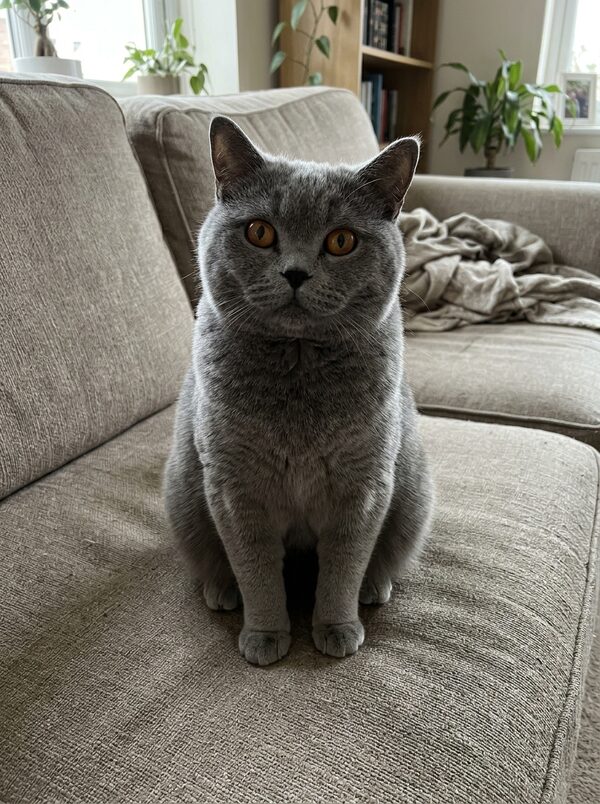
How to Make Your Cat or Dog Clap: The Clapping Pet Reaction Video
A cat clapping its front paws like it is applauding is a long-running reaction meme, sent in reply to good news or a bad joke. The Clapping Pet template on MagicTakes lets your own pet do it from one photo, in a 8-second vertical clip you can send straight back to the group chat.
What the clapping pet meme is
It is a reaction clip. Instead of typing "congratulations" or "well done", you send a video of a pet applauding. The slow-clap version does the opposite job, for a joke that didn't land.
On MagicTakes your pet sits up on its hind legs and looks at the camera in the first second. From one to six seconds it claps its front paws together again and again, in a steady rhythm, with a serious, approving face. In the last two seconds it lowers its paws and gives a small, pleased nod with a slow blink.
The template keeps your own room. Your pet is posed sitting up in the same place as in your photo, on the same sofa, bed or chair, and the camera stays still. That is part of the charm: it looks like your pet, at home, clapping.
Because the room stays your own, it is also one of the quickest templates to get right: if your photo shows your pet and both front paws clearly, most of the work is already done.
How to make it on MagicTakes
- Open the Clapping Pet template.
- Upload one photo of your pet with both front paws visible.
- Choose a style: Applause or Slow clap.
- Tap Make my take. It costs 40 credits, and your first take is free with a small magictakes.com mark.
- Wait two to four minutes. You can leave the page; the take is saved in your library when it is ready.
- Download the 8-second 9:16 MP4 and send it.
Which photo works best
The clap needs two paws to meet, so they have to be in the photo.
A photo taken from the front, at your pet's eye level, works better than one taken from above. From above, the front paws are often hidden under the chest, and the clap has nothing to work with.
- Your pet sitting or lying with both front paws visible
- One pet, facing the camera
- Nothing covering the body, like a blanket or a toy
- Bright and sharp, without filters
- Your pet in focus and not too small in the frame
Applause or Slow clap
Applause is the cheerful version: quick, happy clapping with a pleased face. Use it for good news, a birthday or a friend's new job.
Slow clap is slow and deliberate, with long pauses and a deadpan, unimpressed face. Use it for a bad pun, a late reply or someone announcing they finally did the dishes.
You can make both from the same photo and keep them ready to send.
Your pet's expression in the photo carries through, so a bright, alert face suits Applause and a sleepy or unimpressed face makes the Slow clap even funnier.
Ideas for using it
Eight seconds is short enough to watch without sound, which is how most reactions get seen in a chat. Download the take once and you can send it as often as the good news, or the bad jokes, keep coming.
- Reply to good news in the group chat with the Applause take
- Save the Slow clap take for the next bad joke
- Post it on TikTok, Instagram Reels or YouTube Shorts with a caption like "My review of your cooking"
- Add an applause sound when you post; the take itself is silent
- Send it as a congratulations message instead of a card
When a take doesn't look right
Each take is a new attempt, so if the paws nearly meet or the nod comes too early, make another take from the same photo before you try a different one. Every take stays in your library, so you can keep the version you like.
- The paws don't meet: use a photo where both front paws are clearly visible, then make another take.
- Your pet has extra paws: use a photo where its body isn't hidden by blankets or toys.
- The background changed: use a photo where your pet is in focus and not too small in the frame.
- A take failed to generate: its credits go back to your balance automatically.
Whose pet you can use
Use a photo of your own pet, or of a pet whose owner agreed. If a person is in the photo, crop them out first. Uploads are deleted after 30 days, and your takes stay private unless you share them.
Questions
Why does it keep my background?
Your pet is posed sitting up in the room from your photo, and the camera stays still, so the scene around it stays your own. That keeps it looking like a real home video.
My pet never sits up. Will it still work?
Yes. The first step poses it sitting up on its hind legs with its front paws together. A photo where its whole body and front paws are visible gives the most natural result.
How long is the clip?
Eight seconds, vertical 9:16, which is a good length for a reaction in a chat.
What does it cost after the free take?
40 credits a take. The Starter pack has 100 credits for $9.99, enough for two clapping takes, and credits never expire.